Web-Based Augmented Reality
Experience digital twins of your models in true size and color in any physical environment. No app download required.
WebAR in BASE 3D-AR Studio by BASE BROS opens 3D models in AR from the browser on iPhone and Android.
Start for FreePlace Models in Your Space
View 3D models in their actual size and colors placed directly in any real-world environment
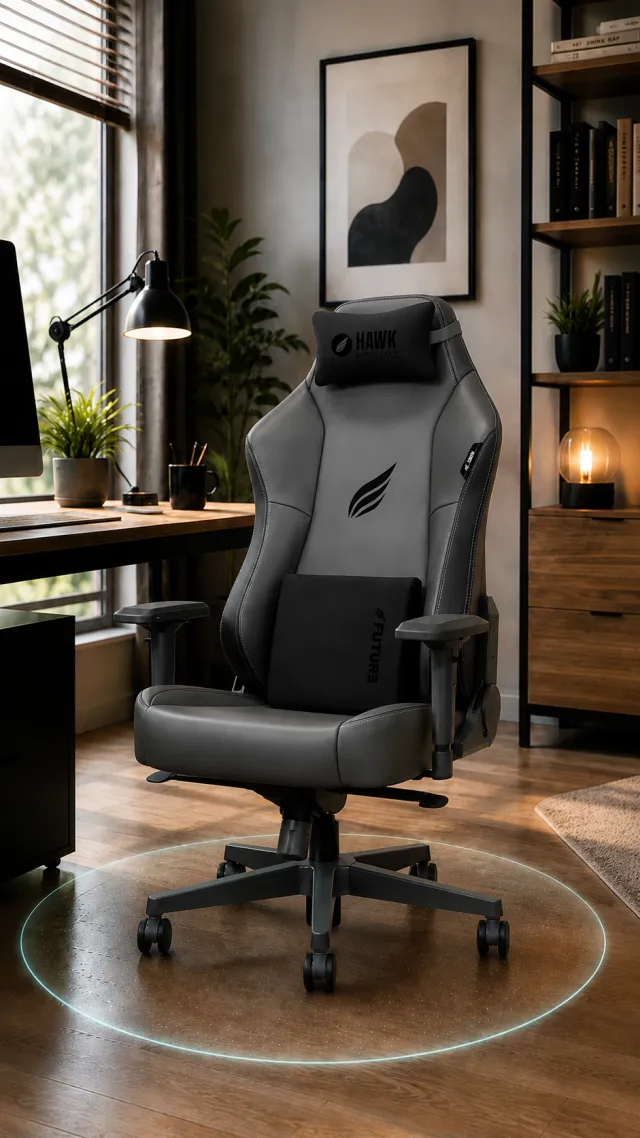
Scan. Place. Experience.
Customers scan a QR code or tap a button and instantly see your model in their room, office or store. True-to-scale placement with real-world lighting and shadows.
One-Tap AR Launch
Share via QR code, link or embed button. Zero friction for your customers.
Point your phone at the code, tap once, and instantly see the model placed at true scale in your own space.
AR in Three Steps
From 3D model to augmented reality experience in seconds
Upload or Generate
Drop your .glb or create one with AI
Fine-Tune & Scale
Materials, lighting, true-to-life scale
Launch in AR
Live on any phone via QR
Real Presence, Any Space
Everything you need to place your models in AR: true scale, real lighting, and one-tap launch on any device.
WebAR Technology
Browser-based AR with no app download. Works instantly on modern iOS and Android devices.
True-to-Scale
Models appear in their real-world dimensions with accurate, grounded positioning.
Real-World Lighting
Automatic lighting adaptation blends every model naturally into the scene with soft shadows.
QR Code Launch
Every model gets a unique QR code. Scan and drop it into your space in AR instantly.
Interactive Controls
Move and rotate the model with intuitive touch gestures. When a real-world size is set, the scale stays fixed at true size.
Easy Integration
Add an AR button to your website or e-commerce store with a single line of embed code.
Works on Every Device
The same AR link adapts to each device: AR Quick Look on Apple devices, WebXR on Android and an interactive 3D view on desktop.
iOS
AR Quick Look
Android
WebXR
Desktop
3D view and QR code
Tablet
Quick Look or WebXR
Supported Formats and Devices
- 3D files
- .GLB upload, up to 75 MB per file and up to 5 files at once, or a model generated with AI in the Studio. FBX, OBJ and STL are not supported.
- iPhone and iPad
- Apple AR Quick Look with a USDZ that BASE builds automatically from your GLB, or your own .usdz of up to 75 MB uploaded in Page Designer
- Android
- WebXR in Chrome (ARCore), showing your latest materials. A browser without WebXR shows a message to open the page in Chrome.
- Desktop
- Interactive 3D view. The AR button opens a QR popup that starts AR on the visitor's phone.
- Sharing
- Every model gets one public 3D-AR page with a link, a QR code and an iframe embed code. Visitors need no account.
- AR inside an embed
- HTTPS and the allow tokens camera, gyroscope, accelerometer and xr-spatial-tracking, already in the embed code
- Analytics
- 12 Quick Stats, including Total Views, QR Scans and AR Activations, with PDF export
- Learn more
- Docs: Publish, AR on mobile and the desktop QR flowDocs: Embed and Developer APIHow to Add 3D and AR to Your Website Without an AppGLB vs USDZ: How to Prepare 3D Models for Web and AR
- Related solutions
- 3D-AR Viewer, AI 3D Generator, Use Cases
Questions about WebAR
Can customers see a 3D model in AR on iPhone without an app?
Yes. BASE 3D-AR Studio opens the model in Apple AR Quick Look straight from the browser on iPhone and iPad, using a USDZ that BASE builds automatically from your GLB. You can also upload your own .usdz of up to 75 MB in Page Designer.
Does browser-based AR work on Android phones?
Yes. On Android, BASE 3D-AR Studio runs AR with WebXR in Chrome and shows your latest materials. A browser without WebXR, such as an in-app browser, shows a message asking the visitor to open the page in Chrome.
What happens when someone presses the AR button on a desktop computer?
On desktop, the AR button of a BASE 3D-AR Studio page opens a QR popup. Scanning the code with a phone starts AR on that phone, while the desktop keeps the interactive 3D view.
Which 3D file format do I need for web AR?
BASE 3D-AR Studio takes .GLB files of up to 75 MB each, up to 5 at once, and builds the USDZ for iPhone automatically. FBX, OBJ and STL are not supported, so convert them to GLB first or generate a model with AI in the Studio.
Can I add AR to my own website or online store?
Yes. Copy the iframe embed code from Share & Embed in BASE 3D-AR Studio and paste it into Shopify, WordPress, Webflow or any custom site. AR inside the embed needs HTTPS and the camera, gyroscope, accelerometer and xr-spatial-tracking permissions, which are already in the code.
Can I see how often my model is opened in AR?
Yes. Analytics in BASE 3D-AR Studio has 12 Quick Stats, including Total Views, QR Scans and AR Activations, and you can export the report as a PDF.
Bring Your Models to Life with Augmented Reality
Place 3D models in any real environment to see how they look, fit and interact with the space around them.