What Is a 3D Product Configurator? Benefits, Examples and When You Need One
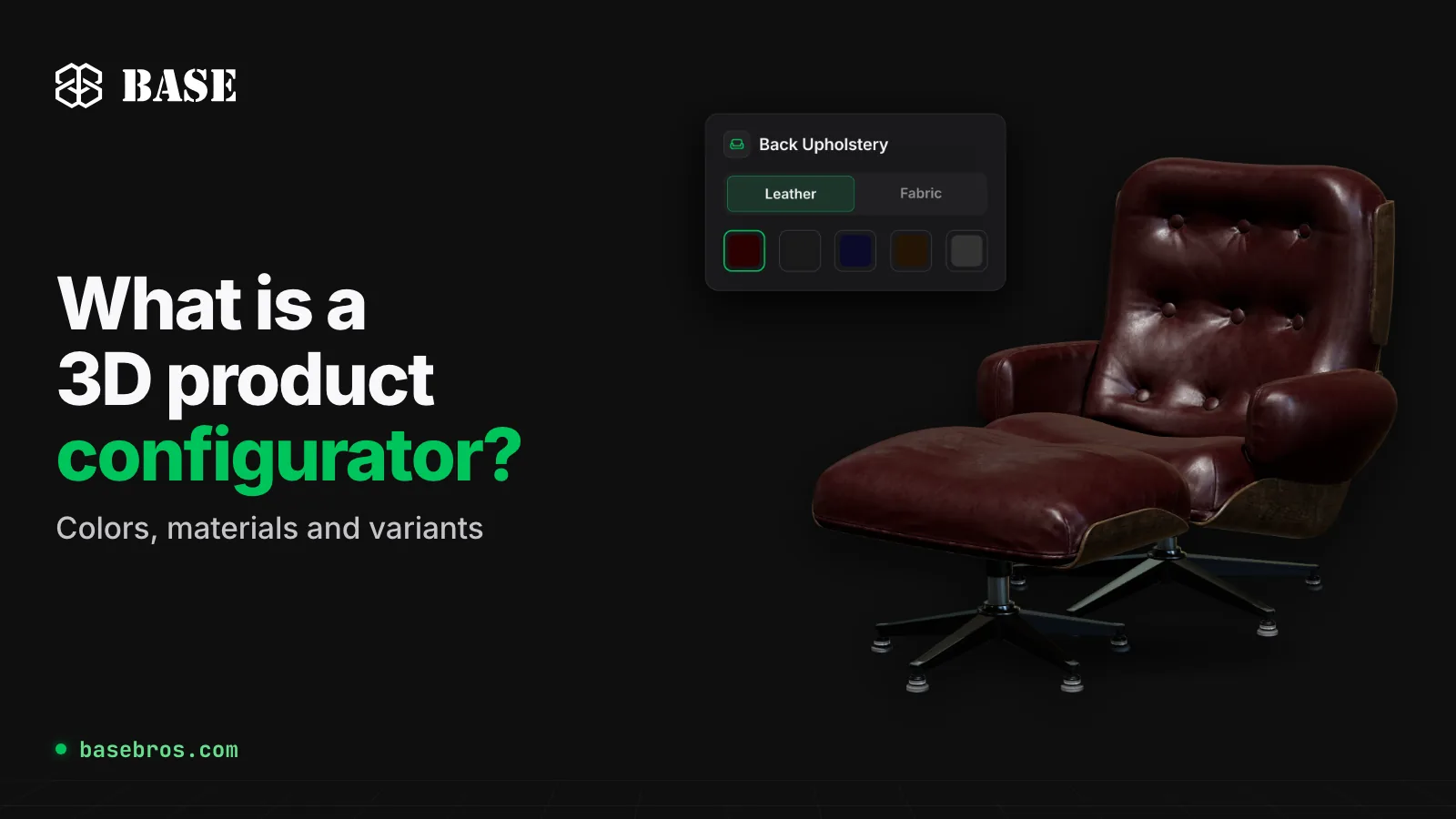
A 3D product configurator is an interactive tool on a web page that lets customers change the colors, materials and variants of a product on a 3D model and see every change in real time. At BASE BROS, 3D configurators are custom projects: the team designs and builds each one for the brand, with an AR preview that opens in the mobile browser without an app. This guide covers how a configurator works, what it offers, which brands use one and when the self-serve 3D Viewer in BASE 3D-AR Studio is all you need.
Key takeaways
- A 3D product configurator, also called a 3D product customizer, shows each choice of color, material or variant on the 3D model as soon as the customer makes it.
- It suits products that come in many combinations of fabric, color, size or pattern, where photographing every option is impractical.
- At BASE BROS, configurators are custom projects built by the team. They are not a Studio feature.
- If one finished look per product is enough, the self-serve 3D Viewer in the Studio covers it: you edit materials, press Save and share the page.
- To start a configurator project, contact BASE BROS sales with a short project description.
What is a 3D product configurator?
A 3D product configurator is a web experience where customers build their own version of a product. They choose options such as color, material, fabric, finish or size from a panel, and the 3D model next to the panel updates in real time. They can rotate and zoom the result to check it from every angle and, on a phone, place the product in their own space with augmented reality.
A 3D viewer and a 3D configurator are closely related. A 3D viewer shows a product as an interactive 3D model that people rotate, zoom and open in AR. A 3D configurator does the same and also lets them change colors, materials and variants themselves. At BASE BROS, the viewer is self-serve in BASE 3D-AR Studio, while configurators are custom projects.
How does a 3D product configurator work?
Every configurator follows the same loop: the customer picks an option, the 3D model shows it at once, and the customer can view the result in AR, capture it or share it.

- Choose options: the product is split into parts, and each part offers its own colors or materials. In the lounge chair demo on the BASE 3D Configurator page, a Leather or Fabric switch sets the upholstery material, and six parts (Back Upholstery, Front Upholstery, Back Wood, Front Wood, Metals and Legs) each offer five options, with a Reset button for the whole set.
- See it in real time: the BASE configurator renders with WebGPU, falls back to WebGL automatically and applies each new color or PBR material to the 3D model instantly.
- View, capture and share: customers place the product in their own space with AR on iOS and Android, straight from the browser. One click captures the configured product, so they can share the exact look.
The same page also features a Nacar pocket watch demo, covered in detail below.
What can a BASE 3D configurator include?
BASE BROS builds each configurator around the product it presents, so the feature set varies by project. The 3D Configurator page lists these building blocks:
- WebGPU rendering: high visual quality in the browser with automatic WebGL fallback.
- Material and texture editor: a material system with PBR textures, custom finishes and real-time preview.
- Color customization: customers pick a color and see it applied instantly on the 3D model.
- Dynamic lighting: configurable light direction, elevation and intensity.
- Variant system: multiple product variants with different materials, sizes and configurations.
- AR preview: customers place the product in their own space on iOS and Android, from the browser with no app.
- Animation playback: built-in model animations, plus turntable auto-rotation.
- Hotspot annotations: labeled markers that highlight materials, parts and key features.
- Instant screenshot: one click captures the configured product, ready to share.
What are the benefits of a 3D product configurator?
- Every combination, without photographing each one. A single 3D model shows every option, which matters most when a product comes in too many combinations to photograph.
- Customers see what they choose. Each change appears on the model at once, and customers can check it from every angle instead of imagining it from a swatch.
- Size and fit in a real room. The AR preview uses surface tracking to place the product on a real floor or table at true scale.
- A result customers can share. The instant screenshot captures the configured product, so a customer can send the exact look to a colleague, a partner or a designer.
- Technical details on the model itself. Hotspot annotations point out materials, parts and key features directly on the 3D model.
- It runs where your customers already are. You embed the finished configurator in your website or online store with an embed code, no plugins required.
A real example: the Nacar pocket watch configurator
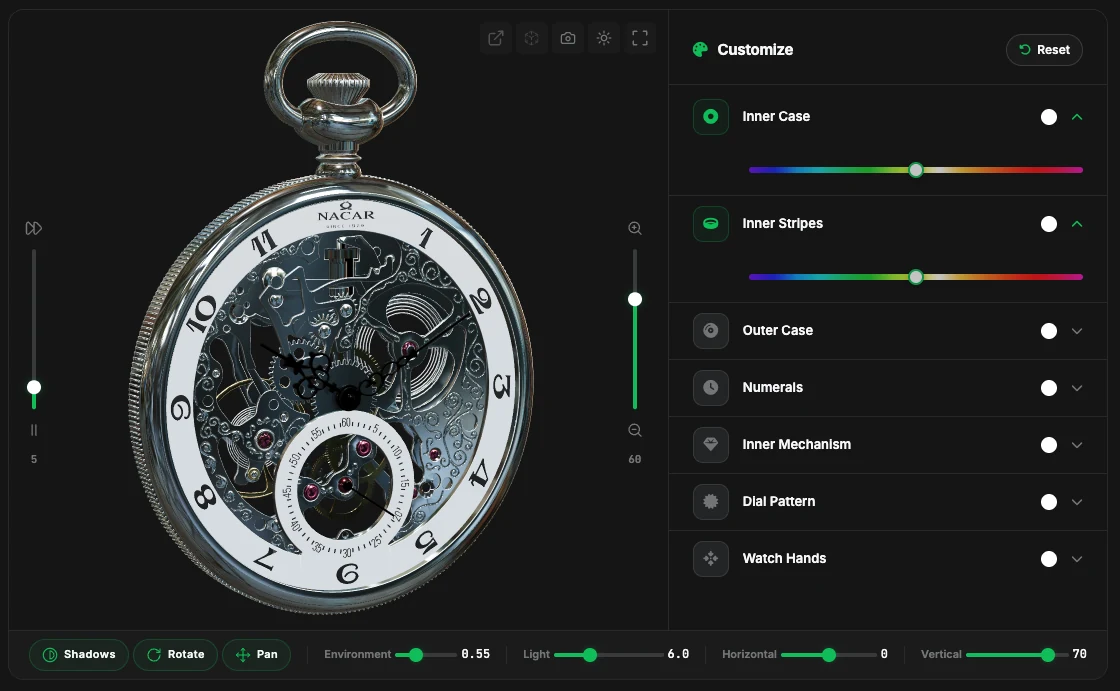
The 3D Configurator page features a configurator built on a pocket watch by Nacar, a Swiss-born heritage watch brand dating back to 1929. It shows in one screen what a configurator puts in your customers' hands: a Customize panel on the right and the watch in real-time 3D on the left.
What customers can change
The watch is split into seven parts, and each one has its own color slider:
- Inner Case and Outer Case
- Inner Stripes
- Numerals
- Inner Mechanism, the movement visible through the skeleton dial
- Dial Pattern
- Watch Hands
Each part opens with one click. As the customer moves its slider, the new color appears on the watch at once, and the dot next to the part name shows the current choice. Reset returns every part to the original colors of the model.
How customers explore the result
| Control | What it does |
|---|---|
| Open Live Page, View in AR, Take Screenshot, Toggle Light/Dark, Fullscreen | The toolbar above the model opens the live page, starts AR, captures the configured watch, switches the background between light and dark, and enlarges the viewer |
| Rotation speed and Zoom | The vertical slider on the left sets the turntable speed and can pause it, while the slider on the right zooms in and out |
| Shadows, Rotate, Pan | Switches that turn shadows, rotation and panning on or off |
| Environment, Light, Horizontal, Vertical | Sliders for environment intensity, light intensity and the horizontal and vertical direction of the light |
The AR preview shows the default finish of the watch. Every project is built specifically for the brand, so the parts, options and controls follow the product. For more projects, see the BASE BROS Showcase and BASE use cases.
Do you need a 3D Viewer or a 3D Configurator?
Not every product needs a configurator. The difference comes down to who makes the choice: you, before publishing, or your customer, on the page.

With the 3D Viewer in the Studio, you set the look yourself. In the Model Editor's Material tab, you pick a part with the eyedropper and edit Base Color, Roughness, Metalness, Normal, Emissive, Occlusion and Alpha. These edits sit in a non-destructive layer, so the original GLB stays unchanged, and nothing goes public until you press Save. Visitors then see that saved look on the live 3D-AR page and can open it in AR. If a product has a few colorways, you can publish each one as its own model with its own page.
With a 3D Configurator, the customer sets the look. The BASE BROS team builds the options panel, the variants and the logic behind them for your product.
| Your situation | Best fit | How you get it |
|---|---|---|
| Show each product in one finished look, in 3D and AR | 3D Viewer | Self-serve in the Studio |
| Adjust colors and materials yourself before publishing | 3D Viewer with the Model Editor's Material tab | Self-serve in the Studio |
| Show a few colorways, each on its own page | One Studio model per variant | Self-serve in the Studio |
| Let customers choose colors, materials or parts on the page | 3D Configurator | Custom project |
| Offer many combinations of fabric, color, size or pattern | 3D Configurator | Custom project |
| Offer options such as dimensions, modules or roof panels | 3D Configurator | Custom project |
| Publish more than 2,000 models or get custom 3D modeling | Enterprise | Contact Sales |
To try the self-serve route first, read How to Create a 3D and AR Product Page with BASE 3D-AR Studio. To build the model from product photos, see Image to 3D. To place the page on your site, see how to add 3D and AR to your website without an app. The Free plan requires no card and includes up to 3 live models and 3 new models per month.
How do you start a 3D configurator project with BASE BROS?
- List your products and options. Note which parts of each product change and which colors, materials, sizes or modules customers can choose.
- Gather your 3D files. If you already have 3D models, share them with the team. To preview a .GLB file first, open it in Quick View, which displays it in the Studio's viewer without uploading it. If you don't have 3D files yet, BASE BROS also offers custom 3D modeling and can build the models for your project.
- Contact sales. The Start Your Project and Schedule Demo buttons on the 3D Configurator page both lead to the Contact page. Send a short project description through the form, choosing Request Demo or Enterprise Inquiry as the subject, or email info@basebros.com.
- Embed the finished configurator. Paste its embed code into your website or e-commerce store. It needs no plugins and no dependencies.
For an overview of every BASE BROS solution, read BASE BROS Solutions Explained. To prepare models for web and AR, see GLB vs USDZ.
Frequently asked questions
What is a 3D product configurator?
A 3D product configurator is an interactive tool on a web page that lets customers change the colors, materials and variants of a product on a 3D model and see each change in real time. It is also called a 3D product customizer.
What is the difference between a 3D viewer and a 3D configurator?
A 3D viewer shows a product as an interactive 3D model that people rotate, zoom and open in AR. A 3D configurator also lets them change colors, materials and variants themselves. At BASE BROS, the viewer is self-serve in BASE 3D-AR Studio, while configurators are custom projects.
Is the 3D Configurator part of BASE 3D-AR Studio?
No. BASE BROS designs and builds each 3D configurator as a custom project. In the Studio, you can edit a model's materials in the Model Editor and publish each variant as its own model. Each live page then shows the look you saved.
Do customers need an app to see the product in AR?
No. BASE AR runs in the mobile browser: iPhone and iPad open Apple AR Quick Look with a USDZ file, and Android opens WebXR in Chrome. Surface tracking places the product on a real surface at true scale. On desktop, visitors scan a QR code to open the page on their phone.
Can I add a 3D configurator to my website?
Yes. Paste the finished configurator's embed code into your website or e-commerce store. No plugins or dependencies are needed.
How do I start a 3D configurator project with BASE BROS?
Contact BASE BROS sales through the Contact page or at info@basebros.com with a short description of your products and the options customers should choose.
Plan your 3D configurator
If you want customers to build their own version of your product, a 3D configurator shows every choice in real time, with an AR preview right in the mobile browser. Contact sales to plan yours with the BASE BROS team, or start for free in the Studio and publish your own 3D and AR product pages today.